

介绍
“众所周知” 这个博客是基于Cloudflare Pages构建的,套用了 Cloudflare 的 CDN 服务。
什么是 CDN?CDN(Content Delivery Network,内容分发网络)是一种分布式网络架构,通过在多个地理位置部署服务器节点,将内容缓存到离用户最近的节点上,从而加速内容的加载速度并提高用户体验。
Cloudflare 在全球部署了多个 CDN 节点,我们如何得知当前连接的是哪一个节点呢?🤔
幸运的是,Cloudflare 提供了一个网关追踪信息的接口/cdn-cgi/trace,我参考了Lufs’s Blog的文章在网页展示上 Cloudflare 网关跟踪信息 —— Cloudflare-Trace-Info-on-Web,受此启发,写了一个JavaScript脚本来实现这个功能
效果展示(为保护隐私,已抹除 IP 信息):
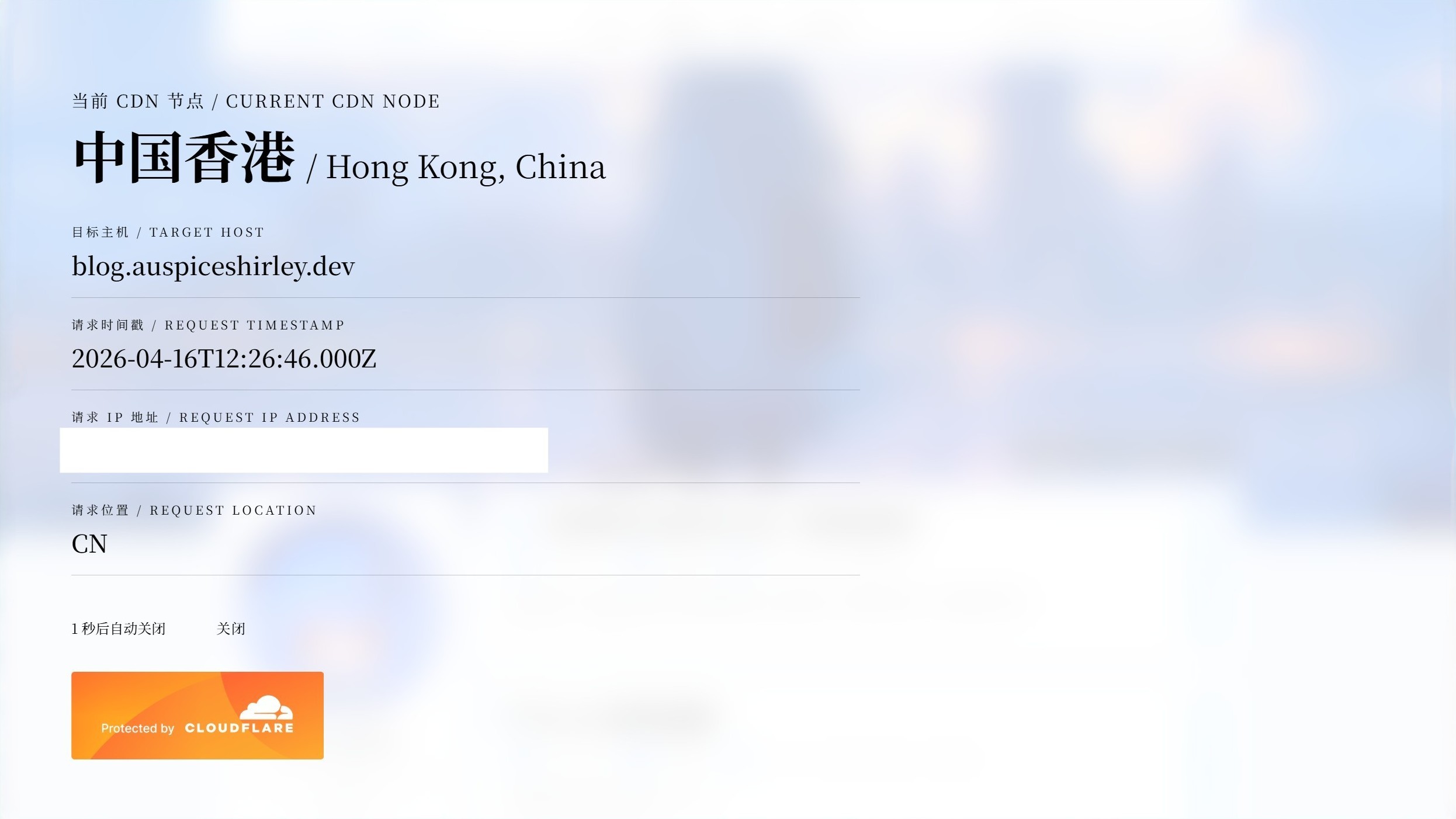
例如,当您访问https://blog.auspiceshirley.dev/cdn-cgi/trace时,您将会看到类似以下的信息:
fl=******h=blog.auspiceshirley.devip=******ts=******visit_scheme=httpsuag=Mozilla/5.0 (Windows NT 10.0; Win64; x64) AppleWebKit/537.36 (KHTML, like Gecko) Chrome/147.0.0.0 Safari/537.36 Edg/147.0.0.0colo=SEAsliver=nonehttp=http/3loc=CNtls=TLSv1.3sni=encryptedwarp=offgateway=offrbi=offkex=******根据Cloudflare 文档,我们得知,其中的colo字段是离节点最近的机场的IATA代码
如何获取机场的IATA代码所对应的实际地理位置?
博客作者LufsX有这样一个项目:
我使用了https://github.com/LufsX/Cloudflare-Data-Center-IATA-Code-list/blob/main/cloudflare-iata-full.json这个文件,但是做了一些修改,现已部署在
https://cdn.auspiceshirley.dev/cloudflare/cdn-info/cloudflare-iata.json脚本连接:
https://cdn.auspiceshirley.dev/cloudflare/cdn-info/cdn-info.js您可以直接把这个脚本添加到您的网页中。
如何使用
将以下代码添加到网站页面的 </body> 标签之前即可:
<script src="https://cdn.auspiceshirley.dev/cloudflare/cdn-info/cdn-info.js"></script>TIP信息页下方的
Protected by Cloudflare图片来源于Cloudflare 媒体资料包 | Cloudflare的Web badges部分,用于向访客展示您的网站受Cloudflare保护
代码
(function () { const ENABLE_SESSION_CHECK = true;
if (ENABLE_SESSION_CHECK && sessionStorage.getItem("__cdn_info_shown")) { return; }
if (ENABLE_SESSION_CHECK) { sessionStorage.setItem("__cdn_info_shown", "1"); }
if (window.__cdnInfoShown) return; window.__cdnInfoShown = true;
const TRACE_URL = "/cdn-cgi/trace"; const IATA_JSON_URL = "https://cdn.auspiceshirley.dev/cloudflare/cdn-info/cloudflare-iata.json"; const COUNTDOWN_SECONDS = 5; //Seconds const REQUEST_TIMEOUT_MS = 4000; //Milliseconds
const BADGE_IMAGE_PATH = "https://cdn.auspiceshirley.dev/cloudflare/web-badges/BDES-5287_ProtectedByCloudflareBadge_web_badges_3.png";
function parseTrace(text) { const data = {}; text .trim() .split("\n") .forEach((line) => { const idx = line.indexOf("="); if (idx > 0) { const key = line.substring(0, idx); const val = line.substring(idx + 1); data[key] = val; } }); return data; }
function createOverlay() { document.body.style.overflow = "hidden"; const overlay = document.createElement("div"); overlay.id = "cdn-info-overlay"; overlay.innerHTML = ` <style> #cdn-info-overlay { position: fixed; top: 0; left: 0; width: 100%; height: 100%; display: flex; align-items: flex-start; justify-content: flex-start; padding: 60px 80px; box-sizing: border-box; z-index: 999999; font-family: serif; pointer-events: auto; user-select: none; overflow-y: auto; -webkit-overflow-scrolling: touch; overscroll-behavior: contain; background: rgba(255, 255, 255, 0.8); backdrop-filter: blur(20px) saturate(180%); -webkit-backdrop-filter: blur(20px) saturate(180%); color: rgb(0, 0, 0); }
@media (prefers-color-scheme: dark) { #cdn-info-overlay { background: rgba(0, 0, 0, 0.8); backdrop-filter: blur(20px) saturate(180%); -webkit-backdrop-filter: blur(20px) saturate(180%); color: rgba(255, 255, 255, 0.8); } }
#info-container { max-width: 900px; width: 100%; display: flex; flex-direction: column; }
.node-line { margin-bottom: 40px; }
.node-label { font-size: 20px; font-weight: 400; letter-spacing: 2px; margin-bottom: 8px; text-transform: uppercase; }
.node-value { font-size: 64px; font-weight: 700; line-height: 1.2; display: flex; align-items: baseline; flex-wrap: wrap; gap: 12px; }
.node-zh { font-size: 64px; font-weight: 700; }
.node-en { font-size: 36px; font-weight: 400; }
.info-line { margin-bottom: 20px; border-bottom: 1px solid; padding-bottom: 16px; border-bottom-color: rgba(0, 0, 0, 0.2); }
@media (prefers-color-scheme: dark) { .info-line { border-bottom-color: rgba(255, 255, 255, 0.2); } }
.info-label { font-size: 14px; font-weight: 400; letter-spacing: 3px; text-transform: uppercase; margin-bottom: 6px; }
.info-value { font-size: 28px; font-weight: 500; word-break: break-word; }
.action-bar { margin-top: 20px; display: flex; align-items: center; gap: 30px; }
#countdown-tip { font-size: 16px; }
#close-btn { background: transparent; border: none; padding: 8px 28px; border-radius: 40px; font-size: 16px; font-weight: 400; cursor: pointer; transition: all 0.25s ease; letter-spacing: 1px; font-family: inherit; color: inherit; }
#close-btn:hover { background: rgba(128, 128, 128, 0.15); transform: scale(1.02); }
.cf-footer { margin-top: 30px; transition: none; }
.cf-footer img { height: 100px; width: auto; display: block; filter: none !important; }
.loading-placeholder { font-size: 28px; margin-top: 40px; }
@media (max-width: 768px) { #cdn-info-overlay { padding: 30px 25px; } .node-value { font-size: 42px; } .node-zh { font-size: 42px; } .node-en { font-size: 24px; } .info-value { font-size: 22px; } .action-bar { flex-direction: column; align-items: flex-start; gap: 15px; } } </style>
<div id="info-container"> <div id="content-area" class="loading-placeholder">正在获取边缘节点信息...</div> <div class="action-bar"> <span id="countdown-tip">${COUNTDOWN_SECONDS} 秒后自动关闭</span> <button id="close-btn">关闭</button> </div> <div class="cf-footer"> <img src="${BADGE_IMAGE_PATH}" alt="Protected by Cloudflare"> </div> </div> `; document.body.appendChild(overlay); return { overlay, contentArea: document.getElementById("content-area"), countdownSpan: document.getElementById("countdown-tip"), closeBtn: document.getElementById("close-btn"), }; }
function renderInfo(traceData, iataData) { const ip = traceData.ip || "—"; const loc = traceData.loc || "—"; const tsRaw = traceData.ts; const colo = traceData.colo || "—"; const h = traceData.h || "—";
let timestampDisplay = "—"; if (tsRaw) { try { const tsMs = parseFloat(tsRaw) * 1000; const date = new Date(tsMs); if (!isNaN(date.getTime())) { timestampDisplay = date.toISOString(); } else { timestampDisplay = tsRaw; } } catch (e) { timestampDisplay = tsRaw; } }
let placeEn = colo; let placeZh = "";
if (iataData && iataData[colo]) { placeEn = iataData[colo].place || colo; placeZh = iataData[colo].place_zh || ""; }
const nodeDisplayZh = placeZh || ""; const nodeDisplayEn = placeEn;
return ` <div class="node-line"> <div class="node-label">当前 CDN 节点 / Current CDN Node</div> <div class="node-value"> <span class="node-zh">${nodeDisplayZh || nodeDisplayEn}</span> ${nodeDisplayZh ? `<span class="node-en"> / ${nodeDisplayEn}</span>` : ""} </div> </div> <div class="info-line"> <div class="info-label">目标主机 / Target Host</div> <div class="info-value">${h}</div> </div> <div class="info-line"> <div class="info-label">请求时间戳 / Request Timestamp</div> <div class="info-value">${timestampDisplay}</div> </div> <div class="info-line"> <div class="info-label">请求 IP 地址 / Request IP Address</div> <div class="info-value">${ip}</div> </div> <div class="info-line"> <div class="info-label">请求位置 / Request Location</div> <div class="info-value">${loc}</div> </div> `; }
function closeOverlay(overlay) { document.body.style.overflow = ""; if (overlay && overlay.parentNode) { overlay.parentNode.removeChild(overlay); } window.__cdnInfoShown = false; }
function startCountdown(seconds, countdownSpan, onFinish) { let remaining = seconds; const update = () => (countdownSpan.textContent = `${remaining} 秒后自动关闭`); update(); const timer = setInterval(() => { remaining--; if (remaining <= 0) { clearInterval(timer); onFinish(); } else { update(); } }, 1000); return timer; }
function fetchWithTimeout(url, options, timeoutMs) { return Promise.race([ fetch(url, options), new Promise((_, reject) => setTimeout(() => reject(new Error("Request timeout")), timeoutMs), ), ]); }
async function init() { const elements = createOverlay(); const { overlay, contentArea, countdownSpan, closeBtn } = elements;
let timer = null; let isClosed = false;
const close = () => { if (isClosed) return; isClosed = true; if (timer) clearInterval(timer); closeOverlay(overlay); };
closeBtn.addEventListener("click", close); timer = startCountdown(COUNTDOWN_SECONDS, countdownSpan, close);
try { const [traceRes, iataRes] = await Promise.all([ fetchWithTimeout(TRACE_URL, {}, REQUEST_TIMEOUT_MS), fetchWithTimeout(IATA_JSON_URL, {}, REQUEST_TIMEOUT_MS).catch( () => null, ), ]);
if (!traceRes.ok) throw new Error(`Trace request failed: ${traceRes.status}`); const traceText = await traceRes.text(); const traceData = parseTrace(traceText);
let iataData = null; if (iataRes && iataRes.ok) { iataData = await iataRes.json(); }
contentArea.innerHTML = renderInfo(traceData, iataData); } catch (error) { contentArea.innerHTML = ` <div style="font-size: 28px; color: rgba(255,100,100,0.8);"> ⚡Error<br> <span style="font-size: 16px; opacity: 0.6;">${error.message}</span> </div> `; } }
init().catch(() => {});})();隐私声明
本脚本仅在浏览器本地运行,不会将从/cdn-cgi/trace获取的 IP、时间戳等信息发送至任何第三方服务器,请放心使用。